Coding tips
Gemini Structured Output With Zod in Next.js
Describe the JSON once in Zod, send z.toJSONSchema() to Gemini as responseJsonSchema, then validate the reply with safeParse and retry once with the errors.
A good AI prompt for a product photo describes five things in plain sentences: the product, the setting, the lighting, the camera angle and the style.

A good AI prompt for a product photo describes five things in plain sentences: the product, the setting, the lighting, the camera angle and the style. For example: "A white ceramic mug on a light oak table, soft morning window light from the left, eye-level shot, shallow depth of field, clean commercial photo." Short keyword lists give weaker results than full descriptive sentences.
This guide gives you a prompt formula, 12 templates you can copy and the limits you should know before using AI images in a listing. You can try every template in Mfaysal IG, the AI image generator on mfaysal.com, which includes 3 free images a month.
Contents
Google's own Gemini image generation guide makes the same point: describe the scene in natural sentences rather than listing disconnected keywords.
Replace the words in brackets with your own product.
AI tools invent details. If you sell a real product, the listing photo must show that product accurately. Marketplaces and UK consumer law expect descriptions, including images, to match what the buyer receives.
A safer workflow is to photograph your real product, remove the background with the free background remover, and use AI only for backgrounds, lifestyle mock-ups and marketing graphics. Our background removal guide covers the details for Amazon, eBay and Vinted.
Images made with Google's Gemini image models carry an invisible SynthID watermark that identifies them as AI-generated, as described in Google's documentation. Some platforms also label AI images. Be open with buyers when an image is a mock-up rather than a photo.
Mfaysal IG runs on Gemini through a server-side API, so your prompts never expose a key in the browser. We explain why that matters in keeping an AI API key off the browser.
Describe the product, setting, lighting, camera angle and style in full sentences, for example: a white mug on an oak table, soft window light from the left, eye-level, shallow depth of field, clean commercial photo.
Use them for backgrounds and lifestyle mock-ups, but your main photos must show the real product accurately. Check each marketplace's current rules.
Ask for a seamless pure white background with even studio lighting, or photograph your product and remove the background with a background remover.
Vague prompts cause it. Add material details, a light direction and a camera angle, and ask for a realistic photo style.
Images from Google's Gemini image models include an invisible SynthID watermark that marks them as AI-generated.
Mfaysal IG includes 3 free images a month. Paid plans add more monthly images.
Last checked: 16 October 2026. Rules and dates can change, so confirm anything important with the official source linked above.
Describe the JSON once in Zod, send z.toJSONSchema() to Gemini as responseJsonSchema, then validate the reply with safeParse and retry once with the errors.
Step by step: a Gemini key from Google AI Studio in .env.local, a server-only helper, a Next.js route handler, Vercel environment variables and a leak test.
How I built Quizwright so the Gemini API key never reaches the browser: one Next.js server route, a server-only import, Zod checks and a single retry.
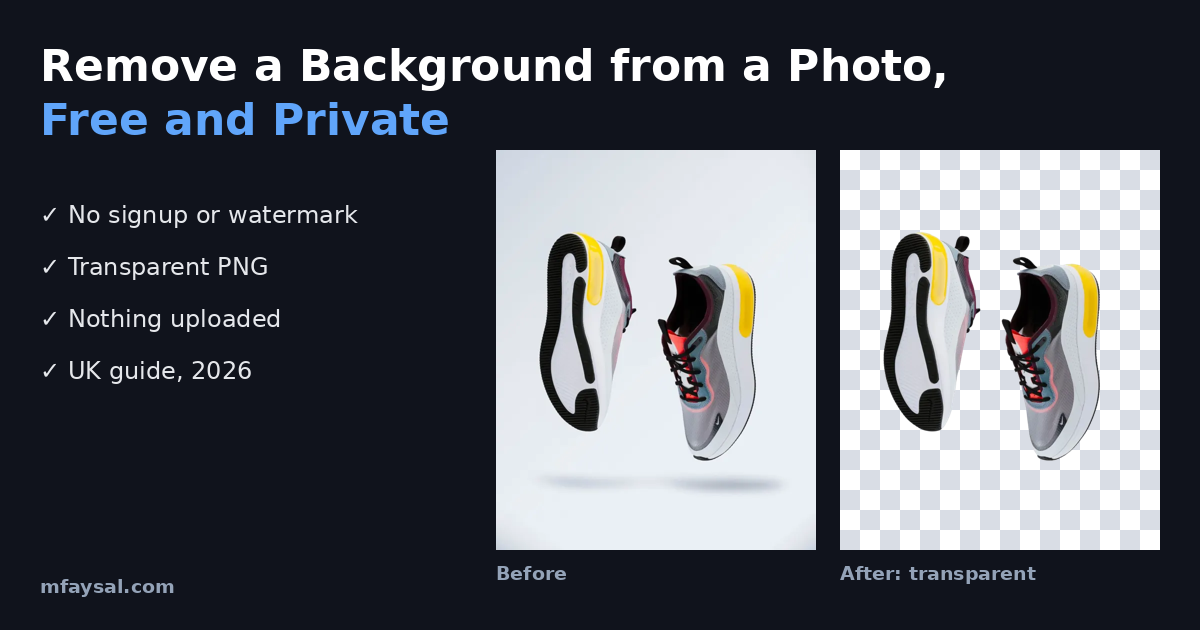
A practical UK guide to removing the background from a photo for free: step-by-step instructions, what transparent PNG means, how to spot fake 'free' tools, privacy under UK GDPR, and tips for Amazon, eBay and Vinted product photos.