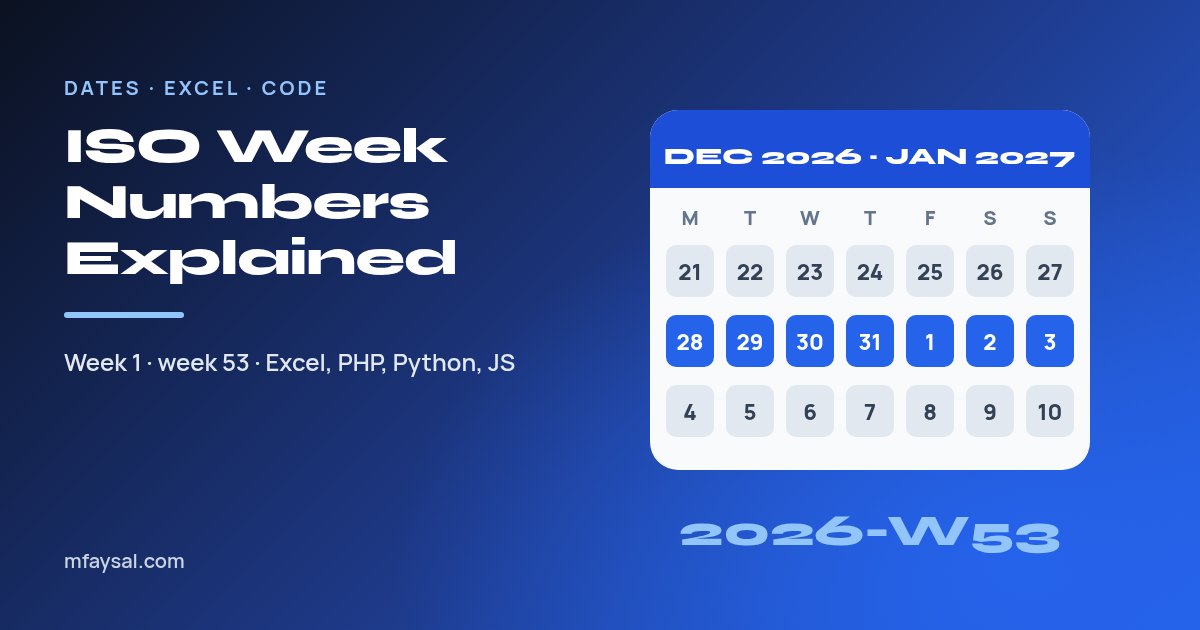
An ISO week number counts the weeks of the year under the ISO 8601 standard: every week runs Monday to Sunday, and week 1 is the week that contains the year's first Thursday (which is always the week containing 4 January). Most years have 52 ISO weeks, but 2026 has 53, because 1 January 2026 fell on a Thursday. Week 53 of 2026 runs from Monday 28 December 2026 to Sunday 3 January 2027.
That last detail is the one that trips people up. Under ISO rules, 1, 2 and 3 January 2027 still belong to week 53 of 2026, so a spreadsheet, payroll export or SQL report that pairs the ISO week with the ordinary calendar year will quietly label them "2027-W53", a week that doesn't exist.
This guide explains the rules in plain English, shows which years have 53 weeks, compares ISO weeks with the Sunday-start numbering common in the US, and gives tested formulas and code for Excel, Google Sheets, PHP, Python, JavaScript and SQL. If you just need the number for one date, the day of the year calculator shows the day number and ISO week for any date.
In this guide:
- The three rules behind ISO week numbers
- Why 2026 has 53 weeks (and which other years do)
- Week numbers around New Year: the 2026 to 2027 boundary
- ISO weeks vs US-style week numbers
- How to get the ISO week in Excel and Google Sheets
- ISO week numbers in PHP
- ISO week numbers in Python
- ISO week numbers in JavaScript
- ISO week numbers in SQL: MySQL and PostgreSQL
- The week-year bug that catches developers out
- Where you'll meet week numbers in everyday work
- Frequently asked questions
The three rules behind ISO week numbers
ISO 8601 is the international standard for writing dates and times. Most people know it for the 2026-10-20 date format, but it also defines a week date: a week-numbering year, a week number and a weekday, written like 2026-W43-2 (Tuesday of week 43 of 2026).
Everything follows from three rules:
- Weeks start on Monday. Monday is day 1 and Sunday is day 7.
- Week 1 is the week with the year's first Thursday. Put another way, it's the first week that has at least four of its seven days in the new year. Because 4 January is always in that week, "the week containing 4 January" is an equivalent rule.
- Weeks are never split. Every week belongs to exactly one week-numbering year, so an ISO year contains either 52 or 53 whole weeks (364 or 371 days).
Why Thursday? It's the middle day of a Monday-to-Sunday week. Whichever year holds the Thursday holds at least four of the week's days, so the week simply goes to the year that owns the majority of it.
Two handy consequences: 4 January is always in week 1, and 28 December is always in the last week of its year. That second fact gives you a neat trick for finding how many weeks a year has, which you'll see in the code below.
Why 2026 has 53 weeks (and which other years do)
A normal year is 52 weeks plus 1 day, and a leap year is 52 weeks plus 2 days. Those spare days pile up, and every five or six years they add up to an extra week.
Under ISO 8601, a year has 53 weeks when 1 January falls on a Thursday, or when it's a leap year that starts on a Wednesday. In both cases the year has 53 Thursdays, and since each week is "owned" by its Thursday, it gets 53 weeks.
1 January 2026 was a Thursday, so 2026 qualifies. Here are the 53-week years either side of it, checked with Python's isocalendar():
| Year | 1 January was a | Week 53 runs |
|---|
| 2015 | Thursday | Mon 28 Dec 2015 to Sun 3 Jan 2016 |
| 2020 | Wednesday (leap year) | Mon 28 Dec 2020 to Sun 3 Jan 2021 |
| 2026 | Thursday | Mon 28 Dec 2026 to Sun 3 Jan 2027 |
| 2032 | Thursday (leap year) | Mon 27 Dec 2032 to Sun 2 Jan 2033 |
| 2037 | Thursday | Mon 28 Dec 2037 to Sun 3 Jan 2038 |
| 2043 | Thursday | Mon 28 Dec 2043 to Sun 3 Jan 2044 |
So if your team plans in ISO weeks, 2026 is the first year since 2020 to have a week 53, and the next one isn't until 2032. Anything that assumes "52 weeks, always" (a dropdown, a database constraint, a chart axis or a budget template) is worth checking before the end of December.
Week numbers around New Year: the 2026 to 2027 boundary
The start and end of the year are where the ISO week-year and the calendar year can disagree. A few days in late December can belong to week 1 of the next year, and a few days in early January can belong to the last week of the previous one.
The 2025 to 2027 boundaries show both effects:
| Calendar date | Weekday | ISO week date | Notice |
|---|
| 28 Dec 2025 | Sunday | 2025-W52-7 | Last day of ISO 2025 |
| 29 Dec 2025 | Monday | 2026-W01-1 | December date, but ISO year 2026 |
| 1 Jan 2026 | Thursday | 2026-W01-4 | The Thursday that makes this week 1 |
| 20 Oct 2026 | Tuesday | 2026-W43-2 | An ordinary mid-year date |
| 28 Dec 2026 | Monday | 2026-W53-1 | Week 53 begins |
| 1 Jan 2027 | Friday | 2026-W53-5 | January date, but ISO year 2026 |
| 3 Jan 2027 | Sunday | 2026-W53-7 | Last day of ISO 2026 |
| 4 Jan 2027 | Monday | 2027-W01-1 | Week 1 of 2027 begins |
The lesson: whenever you show or store an ISO week number, pair it with the ISO week-numbering year, not the calendar year. "Week 53 of 2026" is correct for 1 January 2027. "Week 53 of 2027" is nonsense, because 2027 only has 52 ISO weeks.
ISO weeks vs US-style week numbers
ISO 8601 isn't the only system in use. Calendars in the US and Canada usually start the week on Sunday, and a common way of numbering weeks there is simpler: the week containing 1 January is week 1, whatever day it falls on.
Excel's WEEKNUM function uses exactly that approach by default. Microsoft calls it System 1 (the week containing 1 January is week 1, weeks begin on Sunday) and describes System 2 as the ISO 8601 method, "commonly known as the European week numbering system".
The two systems agree for most of the year and then drift apart at the edges:
| Date | WEEKNUM (default, Sunday start) | ISO week |
|---|
| Thu 1 Jan 2026 | 1 | 1 |
| Sun 4 Jan 2026 | 2 | 1 |
| Tue 20 Oct 2026 | 43 | 43 |
| Sun 27 Dec 2026 | 53 | 52 |
| Fri 1 Jan 2027 | 1 | 53 |
| Sun 3 Jan 2027 | 2 | 53 |
| Sun 31 Dec 2028 | 54 | 52 |
That last row surprises people. Because the US-style system lets partial weeks count, a leap year that starts on a Saturday, such as 2028, ends with a one-day "week 54". ISO years never do that.
Neither system is wrong. The problem only appears when two teams, or two pieces of software, quietly use different ones. If you work with colleagues in the UK, Europe and the US, say "ISO week" explicitly, or better still write the dates of the week next to the number.
How to get the ISO week in Excel and Google Sheets
Both spreadsheets have a dedicated function, so you don't need to remember any return-type codes.
| What you want | Formula (date in A2) | Result for 1 Jan 2027 |
|---|
| ISO week number | =ISOWEEKNUM(A2) | 53 |
| ISO week number (alternative) | =WEEKNUM(A2,21) | 53 |
| ISO week-numbering year | =YEAR(A2-WEEKDAY(A2,2)+4) | 2026 |
| Label like 2026-W53 | =YEAR(A2-WEEKDAY(A2,2)+4)&"-W"&TEXT(ISOWEEKNUM(A2),"00") | 2026-W53 |
| Monday of that week | =A2-WEEKDAY(A2,2)+1 | 28 Dec 2026 |
The year formula works by jumping to the Thursday of the date's week (WEEKDAY(A2,2) returns 1 for Monday through 7 for Sunday) and taking that Thursday's year. Since the Thursday decides which year owns the week, that's always the correct ISO year.
In Google Sheets, ISOWEEKNUM works the same way. Google's help page spells out the edge cases: if the first Thursday is after 4 January, at least one of 1 to 3 January gets week 52 or 53, and if it's before 4 January, at least one of 29 to 31 December gets week 1.
A practical tip for pivot tables: group by the "2026-W53" style label rather than the week number alone, otherwise week 53 of 2026 and week 1 of 2027 can end up in the wrong year's totals.
ISO week numbers in PHP
PHP has had ISO week support built into date() and DateTime::format() for a long time. The two format characters you need are W (the ISO week number) and o (lowercase letter o, the ISO week-numbering year).
$d = new DateTimeImmutable('2027-01-01');
echo $d->format('o-\WW-N');   // 2026-W53-5
echo $d->format('W');          // 53

// How many ISO weeks does a year have? 28 December is always in the last week.
function isoWeeksInYear(int $y): int {
    return (int) (new DateTimeImmutable("$y-12-28"))->format('W');
}
echo isoWeeksInYear(2026);      // 53
echo isoWeeksInYear(2027);      // 52

// Monday of a given ISO week
echo (new DateTimeImmutable())->setISODate(2026, 53)->format('D j M Y'); // Mon 28 Dec 2026
The PHP manual describes o as having "the same value as Y, except that if the ISO week number (W) belongs to the previous or next year, that year is used instead". That sentence is the whole story. Use o with W, never Y with W.
If you mix them up, format('Y-\WW') on 29 December 2025 prints 2025-W01, a week that was really at the start of January 2025. A report grouped on that label would merge two different weeks a year apart.
ISO week numbers in Python
Python's date.isocalendar() returns the ISO year, week and weekday together, which makes the year mistake much harder to make.
from datetime import date

d = date(2027, 1, 1)
print(d.isocalendar())              # IsoCalendarDate(year=2026, week=53, weekday=5)
print(d.strftime("%G-W%V-%u"))      # 2026-W53-5

# Monday of ISO week 53, 2026
print(date.fromisocalendar(2026, 53, 1))   # 2026-12-28

# Weeks in an ISO year
def iso_weeks_in_year(y):
    return date(y, 12, 28).isocalendar().week

print(iso_weeks_in_year(2026))      # 53
When formatting, the Python datetime documentation lists %G as the ISO 8601 year, %V as the ISO week (week 01 is the week containing 4 January) and %u as the ISO weekday. It also warns that %G and %Y are not interchangeable: date(2027, 1, 1).strftime("%Y-W%V") gives 2027-W53, which is wrong.
Be careful with %U and %W too. They count weeks starting on Sunday and Monday respectively, but days before the first Sunday or Monday fall into "week 0", so they never match ISO numbering at the start of the year.
In pandas, Series.dt.isocalendar() returns a DataFrame with year, week and day columns. Group on year and week together.
ISO week numbers in JavaScript
The classic Date object has no week-number method, so for years developers have used a small helper. This version jumps to the Thursday of the week, exactly like the Excel formula above, and works in every browser:
function isoWeek(date) {
  const d = new Date(Date.UTC(date.getFullYear(), date.getMonth(), date.getDate()));
  const day = d.getUTCDay() || 7;          // Sunday becomes 7
  d.setUTCDate(d.getUTCDate() + 4 - day);  // move to the Thursday of this week
  const yearStart = new Date(Date.UTC(d.getUTCFullYear(), 0, 1));
  const week = Math.ceil(((d - yearStart) / 86400000 + 1) / 7);
  return { year: d.getUTCFullYear(), week };
}

isoWeek(new Date(2027, 0, 1));   // { year: 2026, week: 53 }
isoWeek(new Date(2025, 11, 29)); // { year: 2026, week: 1 }
Working in UTC avoids an off-by-one error on the day the clocks change, when a "day" in local time is 23 or 25 hours long.
The newer Temporal API has this built in. On MDN's weekOfYear page, Temporal.PlainDate.from("2021-01-01").weekOfYear returns 53 and yearOfWeek returns 2020, and MDN reminds you to use yearOfWeek, not year, alongside it. MDN marks the feature as "Limited availability" because it doesn't yet work in some widely used browsers, so keep the helper as a fallback for now.
ISO week numbers in SQL: MySQL and PostgreSQL
Databases are where week-number bugs tend to hide, because a GROUP BY silently merges rows rather than throwing an error.
PostgreSQL uses ISO weeks by default. The PostgreSQL date/time documentation says EXTRACT(WEEK ...) returns "the number of the ISO 8601 week-numbering week of the year", and EXTRACT(ISOYEAR ...) gives the matching year:
SELECT EXTRACT(ISOYEAR FROM DATE '2027-01-01') AS iso_year,  -- 2026
       EXTRACT(WEEK    FROM DATE '2027-01-01') AS iso_week;  -- 53

-- Weekly totals, safely grouped
SELECT to_char(order_date, 'IYYY-"W"IW') AS iso_week, SUM(total)
FROM orders
GROUP BY 1
ORDER BY 1;
In to_char, use IYYY and IW together. YYYY with IW has the same mismatch as PHP's Y with W.
MySQL is less obvious, because plain WEEK(date) uses mode 0 by default, with weeks starting on Sunday and a possible week 0. For ISO weeks use mode 3, or WEEKOFYEAR(), which is equivalent. For grouping, YEARWEEK(date, 3) returns the ISO year and week as one number, such as 202653 for 1 January 2027.
The week-year bug that catches developers out
Nearly every week-number bug comes down to one mistake: combining the ISO week number with the ordinary calendar year. It usually goes unnoticed for 51 weeks and then shows up between Christmas and New Year, when fewer people are watching.
Java and Kotlin developers meet a version of it in date patterns. In the Java DateTimeFormatter documentation, uppercase Y is "week-based-year" while lowercase y is the normal year of era. A pattern written as YYYY-MM-dd instead of yyyy-MM-dd looks fine all year, then prints the wrong year for a few days around New Year.
Here's a short checklist for any code or spreadsheet that uses week numbers:
- Pair ISO week with ISO year everywhere:
o + W in PHP, %G + %V in Python, IYYY + IW in PostgreSQL, yearOfWeek + weekOfYear in Temporal. - Allow week 53 in validation rules, dropdowns and database constraints.
- Test with 29 December 2025, 1 January 2027 and 3 January 2027. Those three dates catch almost every mistake.
- Decide whether your business uses ISO or Sunday-start weeks, and write it down.
- Show the date range ("w/c 28 Dec 2026") next to the week number in anything customers or colleagues read.
Where you'll meet week numbers in everyday work
Outside software, week numbers turn up more often than you might expect:
- Retail and logistics. Delivery schedules, stock planning and promotions are often planned by week rather than by date.
- Manufacturing. Some date codes on products and batches use a year and week number.
- Schools and universities. Term planners and timetables frequently label teaching weeks by number.
- Agile teams. Sprints and release trains are often named after the ISO week they start in.
- Payroll and rotas. Weekly-paid staff and shift patterns run on fixed Monday or Sunday cycles.
Week numbers are good for planning, but deadlines usually need working days. If a contract says "within 10 working days", count weekdays and skip bank holidays. The working days calculator does that for England and Wales, Scotland and Northern Ireland, including the 2026 Christmas substitute bank holiday on Monday 28 December, the first day of ISO week 53.
Frequently asked questions
What week number is it today?
On Tuesday 20 October 2026, the ISO week number is 43 (2026-W43). For any other date, a day-of-the-year calculator, the ISOWEEKNUM function in Excel or Google Sheets, or date.isocalendar() in Python will tell you.
How many weeks are there in 2026?
2026 has 53 ISO weeks because 1 January 2026 fell on a Thursday. Week 53 runs from Monday 28 December 2026 to Sunday 3 January 2027. 2027 has 52 ISO weeks.
When does week 1 of 2027 start?
ISO week 1 of 2027 starts on Monday 4 January 2027. The first three days of January 2027 belong to week 53 of 2026.
Does the ISO week start on Monday or Sunday?
ISO weeks always start on Monday and end on Sunday. Calendars in the US and Canada usually start on Sunday, which is why US-style week numbers can differ from ISO ones near the start and end of the year.
Which years have 53 weeks?
Years that start on a Thursday, and leap years that start on a Wednesday, have 53 ISO weeks. Recent and upcoming examples are 2015, 2020, 2026, 2032, 2037 and 2043.
Why does Excel give a different week number from my calendar?
Excel's WEEKNUM uses Sunday-start weeks with 1 January always in week 1, unless you tell it otherwise. Use ISOWEEKNUM, or WEEKNUM with return type 21, to get ISO 8601 week numbers.
What is the difference between W and o in PHP?
W is the ISO week number and o is the ISO week-numbering year. Always use them together, as in format('o-\WW'). Pairing W with the normal year Y gives wrong labels for a few days around New Year.
Can a date in January be in week 52 or 53?
Yes. If 1 January falls on a Friday, Saturday or Sunday, those early January days belong to the last ISO week of the previous year. For example, 1 January 2027 is in week 53 of 2026.
Last checked: 20 October 2026. Figures, settings and guidance can change, so confirm anything important with the sources linked above.